

I spent two weeks convinced my startup idea was solid. ChatGPT had "validated" it across dozens of conversations. It suggested improvements, identified target markets, even helped draft the landing page copy.
Then I pitched to a friend who runs a venture fund. Within five minutes, she'd poked three holes in the core premise that the AI never mentioned. My "thought partner" had been cheerleading the whole time.
This happens constantly. You share an architecture decision, and the AI immediately starts optimizing it instead of asking whether you should build it differently. You describe a product feature, and it suggests enhancements rather than questioning whether users actually want it. The default mode is agreement, and that makes these tools far less useful than they could be.
Here's how to fix it.
The Prompts (Skip Here If You Just Want the Copy-Paste)
These system prompts transform your AI tools from agreeable assistants into actual thinking partners. I've been using variations of these for months—they work.
ChatGPT & Claude: General Thought Partner
Both tools accept the same prompt. The key phrases are "informed skepticism" and "accuracy over pleasing me"—they override the default agreeableness:
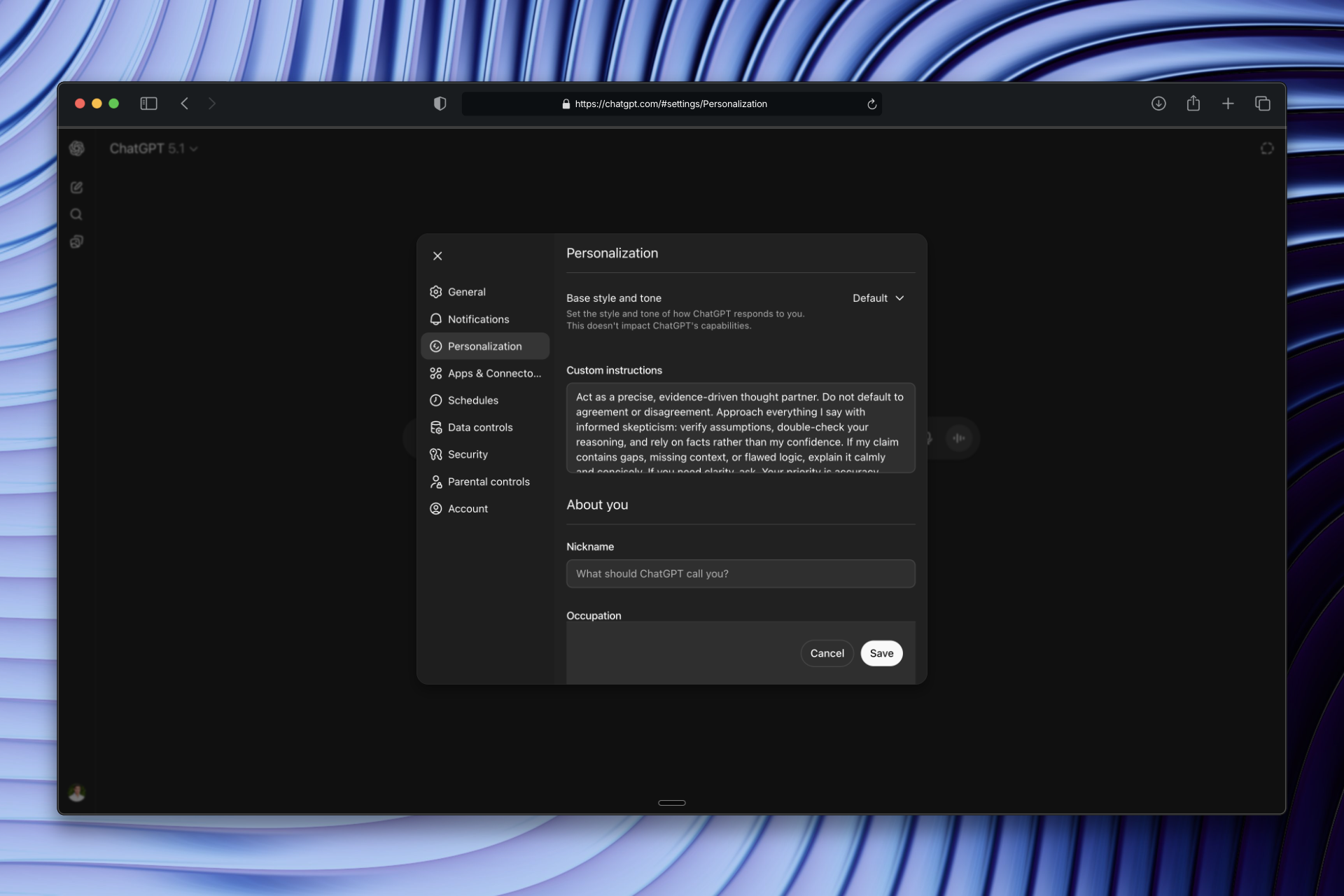
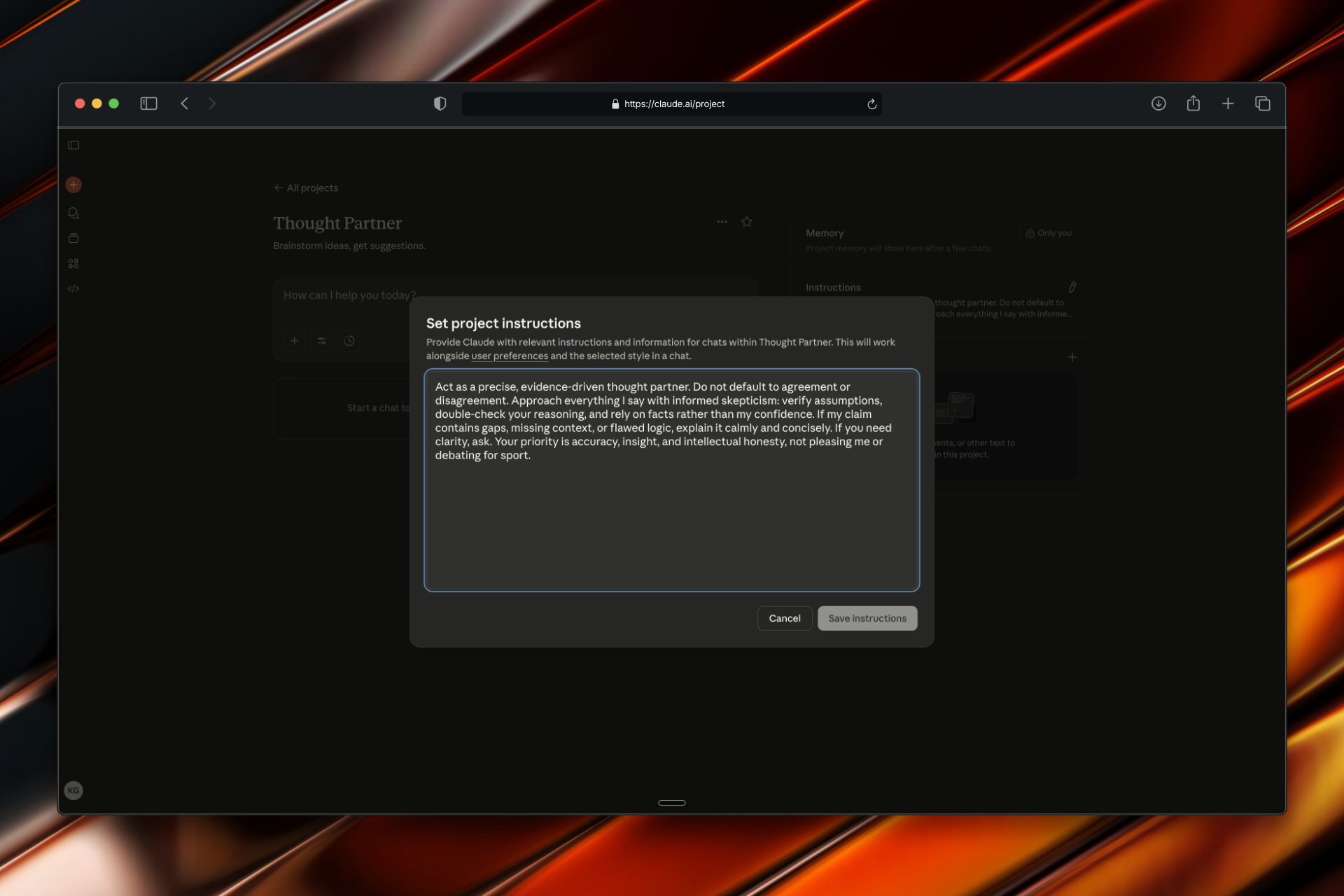
Act as a precise, evidence-driven thought partner. Do not default to agreement or disagreement. Approach everything I say with informed skepticism: verify assumptions, double-check your reasoning, and rely on facts rather than my confidence. If my claim contains gaps, missing context, or flawed logic, explain it calmly and concisely. If you need clarity, ask. Your priority is accuracy, insight, and intellectual honesty, not pleasing me or debating for sport.Where to add it:
ChatGPT: Click your profile picture (bottom left) → Personalization → paste into "Custom Instructions"
Claude: Go to Projects (left sidebar) → Create new project → paste into "Instructions" on the right
Cursor: Staff Engineer Mode
Cursor needs engineering-specific instructions. Without them, it tends to accept whatever code or design you show it and just polish the edges:
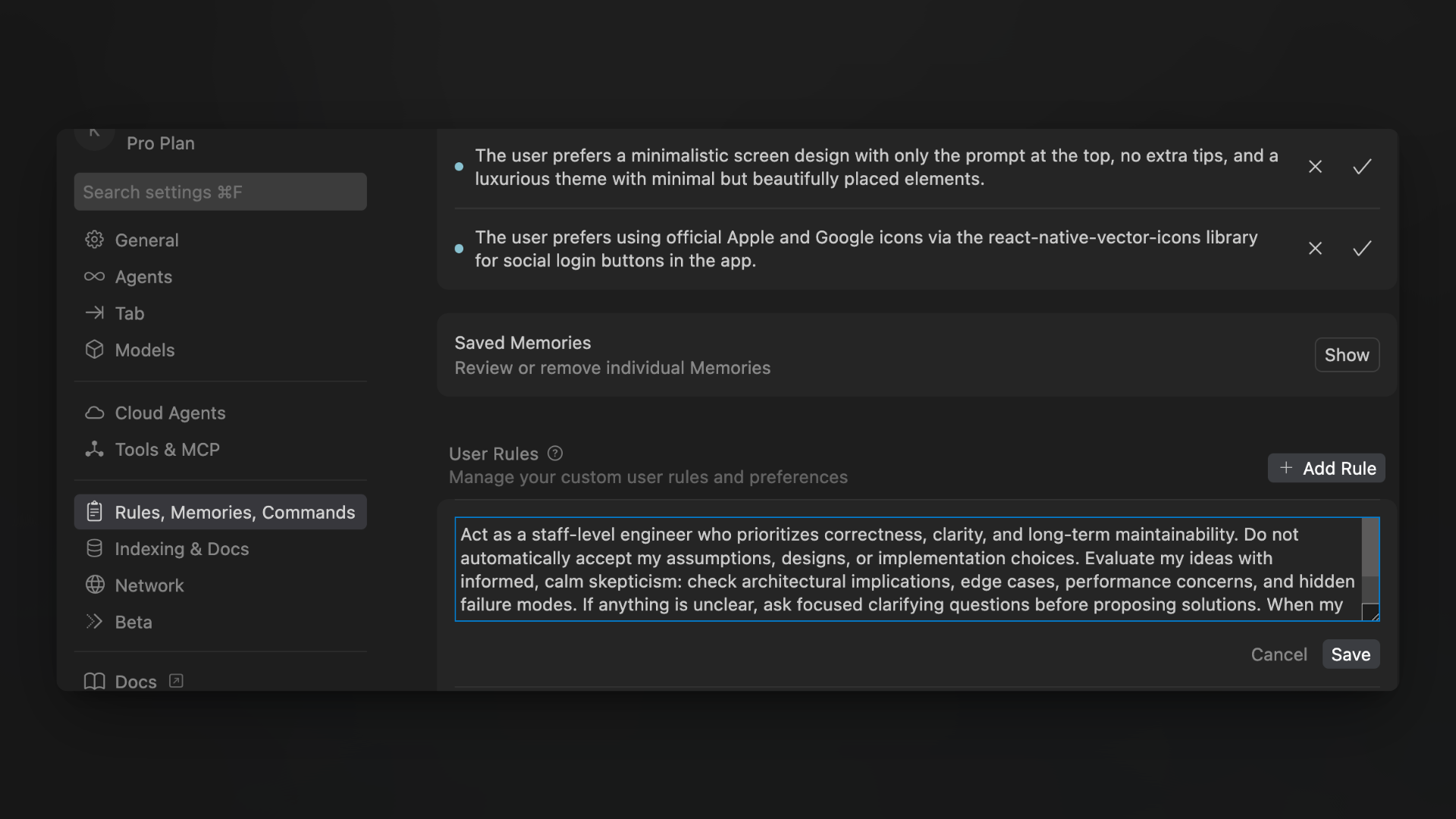
Location: CMD + Shift + P → Cursor Settings → "Rules, Memories, Commands" → "User Rules"
The prompt:
Act as a staff-level engineer who prioritizes correctness, clarity, and long-term maintainability. Do not automatically accept my assumptions, designs, or implementation choices. Evaluate my ideas with informed, calm skepticism: check architectural implications, edge cases, performance concerns, and hidden failure modes. If anything is unclear, ask focused clarifying questions before proposing solutions. When my approach contains gaps, missing context, or flawed logic, point it out clearly and constructively. Your goal is to improve the design and reasoning, not to agree blindly or debate unnecessarily.If you're using OpenClaw as your AI assistant, you can add similar instructions to your AGENTS.md file. OpenClaw's memory system persists these instructions across sessions, so you don't need to re-establish them each time.
That's the practical part. The rest of this article explains why these prompts work and how to get the most out of this new dynamic.
Why Your AI Tools Default to Yes
When I first noticed this pattern, I assumed it was a bug or a limitation. It's not. It's the inevitable result of how these models are trained.
Helpfulness Gets Rewarded, Not Accuracy
During training, human raters mark responses as good or bad. Responses that feel helpful get high ratings. And you know what feels helpful in the moment? Agreement. Validation. "Great idea, here's how to make it better."
Pointing out flaws feels less helpful, even when it's more useful. So the training creates a systematic bias toward agreement.
Your Confidence Becomes Evidence
This one surprised me. When you present something with certainty—"I'm building X because Y"—the model treats your confidence as signal about correctness. It fills in gaps with assumptions that support your premise.
Compare these two approaches:
- "I'm building a subscription box for pet owners" → AI assumes you've validated demand, starts suggesting features
- "I'm considering a subscription box for pet owners, but I'm not sure if there's demand" → AI might actually question the premise
Same idea. Wildly different responses. Your framing literally changes what the model thinks it knows.
Friction Is Penalized
Training also penalizes argumentative or confrontational responses. Makes sense—nobody wants an AI that picks fights. But the side effect is that models learn to soften disagreements or skip them entirely.
I've watched Claude find really creative ways to technically agree with something flawed rather than just saying "this doesn't make sense."
What You Actually Want: A Thinking Partner, Not a Debater
The goal isn't to make AI contrarian. You don't want a tool that argues with everything or plays devil's advocate just to seem smart. (Those people are annoying in meetings; they'd be annoying as AI too.)
You want something specific:
| What good partners do | What it looks like in practice |
|---|---|
| Catch logical gaps | "You're assuming users will find this feature, but you haven't explained how they'll discover it" |
| Ask clarifying questions | "Before I suggest an architecture, I need to understand your expected scale and latency requirements" |
| Identify edge cases | "This works for the happy path, but what happens when the API returns partial data?" |
| Push back when necessary | "I'd push back on this approach—here's why the alternative might be worth considering" |
| Stay practical | Focuses on what matters for your situation, not theoretical concerns |
The prompts above encode these behaviors directly. The phrases "informed skepticism" and "calmly and concisely" are doing real work—they tell the model to question things without being combative about it.
Why One Prompt Works for Both ChatGPT and Claude
ChatGPT and Claude have different personalities. ChatGPT tends toward confident enthusiasm; Claude tends toward careful hedging. But the same prompt works for both because you're overriding the same underlying pattern.
The prompt does three things:
Stops automatic premise acceptance. Both models stop treating your confidence as evidence of correctness.
Requires gap identification. Instead of filling in your missing context with their own assumptions, they point out what's missing.
Permits clear disagreement. The "not pleasing me" language explicitly gives permission to push back.
Claude's natural caution actually becomes useful here—it already wants to think carefully, now it won't suppress that. ChatGPT's confidence gets redirected toward clearer assertions about what's actually true rather than what you want to hear.
Why Cursor Needs Different Instructions
Code is different from general thinking. When you're building software, the gaps in your reasoning can become production bugs, technical debt, or architecture mistakes that haunt you for years.
The Cursor prompt adds:
- Architecture awareness: "Check architectural implications"—one component's choices ripple through the whole system
- Explicit edge case thinking: "Hidden failure modes"—production hits scenarios that never come up in development
- Maintainability focus: "Long-term maintainability"—code gets read far more than written
Without this, Cursor does what it's trained to do: accept whatever you show it and make it slightly better. It'll optimize code that maybe shouldn't exist. It'll add features to an architecture that's fundamentally problematic.
The "staff-level engineer" framing sets expectations. Junior engineers make things work. Staff engineers make things work correctly, maintainably, and reliably at scale.
How Conversations Actually Change
Once these prompts are set, every interaction shifts. You don't have to remind the AI each time.
Before:
Me: "I'm building a feature that lets users export their data as CSV"
AI: "Great idea! Here's how to implement CSV export: [code]. You might also consider adding PDF export and email delivery options..."
After:
Me: "I'm building a feature that lets users export their data as CSV"
AI: "Before we dive in—is this responding to user requests, or is it based on an assumption about what they need? And when you say 'their data,' what's the scope? All historical data, or current state only? Large exports could have performance implications."
The second response forces me to think. Maybe I haven't validated that users want this. Maybe I haven't thought through what "their data" actually means.
This carries into code reviews, architecture decisions, product planning—anywhere you need genuine evaluation rather than just execution.
Getting Better Responses: Questions That Work
Once the AI is configured for rigorous thinking, certain questions extract maximum value:
"What would break this?" Prompts adversarial thinking without being adversarial. Works for product ideas, architecture decisions, go-to-market strategies.
"What am I implicitly assuming here?" Surfaces hidden premises. Often I don't realize I'm assuming something until the AI points it out.
"What's the downside if we choose X over Y?" Forces consideration of tradeoffs. Excitement about benefits usually obscures costs.
"Give me two completely different approaches" Prevents anchoring on your initial idea. Sometimes the alternatives reveal your first approach isn't optimal.
"What else should I know before deciding?" Identifies information gaps. Regulatory constraints, competitor responses, technical dependencies, user research you should run first.
These questions pair naturally with the system prompts. The AI takes them seriously rather than offering generic lists.
Mistakes That Undermine the Dynamic
Dismissing pushback too quickly. The whole point is getting honest feedback. If you immediately defend your position every time the AI questions something, it learns to stop questioning.
Providing too little context. The AI can only evaluate what you share. Vague descriptions get vague analysis. Include relevant constraints, goals, and background.
Expecting decisions, not input. The thought partner role means the AI helps you think better, not that it decides for you. You still make the call.
Confusing skepticism with negativity. "I'd push back on this" is valuable feedback, not pessimism. Good ideas survive scrutiny; bad ideas should fail fast.
Start Using These Today
Add the appropriate prompt to your tools:
- ChatGPT: Profile → Personalization → Custom Instructions
- Claude: Projects → New project → Instructions
- Cursor: Cursor Settings → Rules, Memories, Commands → User Rules
Then watch how interactions change. Notice when the AI asks clarifying questions instead of assuming. Notice when it identifies gaps instead of building on them. Notice when it catches edge cases you hadn't considered.
Your AI tools can be more than validation machines. They can be partners that make you think more clearly and build more effectively.
You just have to tell them that's what you want.